Podcasts RSS Feed Explained and How It Works
podcasts rss feedpodcast feed urlrss feed formatpodcast hostingfeed troubleshooting
September 19, 2026
17 min read
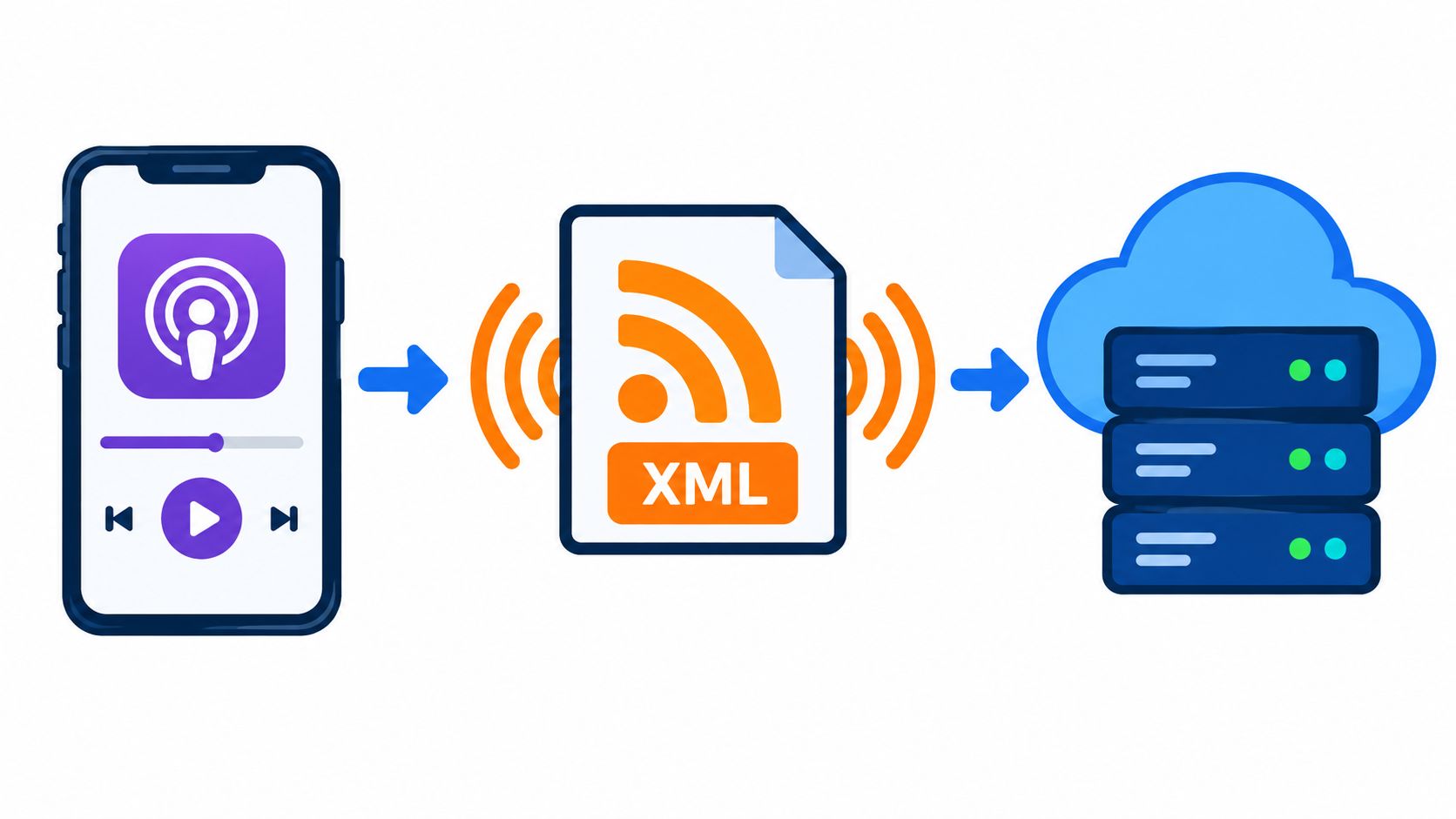
A listener hears that a private interview episode is out soon, opens their podcast app, subscribes, and expects the next episode to appear without effort. At the same time, a first-time creator stares at a hosting dashboard, sees a field called “Feed URL,” and wonders why one strange link seems to matter so much.
Those two moments run through the same file. A podcast RSS feed is the quiet delivery system behind subscription, episode updates, and directory listings. If that file is healthy, shows flow into Apple Podcasts, Pocket Casts, Overcast, and other apps. If it breaks, the show can look fine on the host's website while disappearing everywhere else.
Podcasting still runs on this model for a reason. The technical milestone was RSS support for audio enclosures in early 2001, followed by feed-based audio delivery in 2004 and Apple's podcast support in iTunes by 2005, which pushed RSS podcasting into the mainstream, as described in this history of RSS and the first podcast feed.
If you're a listener, you probably don't care about XML tags. You care that when you subscribe, the show arrives. If you're a creator, you care that when you publish, the episode shows up in the apps your audience uses.
Those are the same problem from opposite ends.
A listener taps Follow. Their app stores the feed URL, checks it again later, and looks for new episode entries. A creator pastes a feed into Apple Podcasts or Spotify once, and those platforms keep checking that same address for changes. The whole promise is simple: publish once, update many places automatically.
For newcomers, this is why a host or generator keeps talking about feeds instead of manual uploads. If you're using a tool that creates episodes on a schedule, such as an AI podcast generator, the output still needs a stable feed so podcast apps know where to look.
People usually get stuck in one of these places:
A podcast feed isn't just a file you submit once. It's a live publishing endpoint.
That's the mindset shift that makes the rest of podcast RSS feed troubleshooting much easier.
Think of a podcast RSS feed like a magazine subscription card.
The publisher doesn't call every reader one by one when a new issue is ready. The publisher updates a delivery system that already knows where the subscriber is. A podcast app works the same way. Once it has your feed URL, it keeps checking that address for new episodes.
A podcast RSS feed is a structured text file, usually written in XML, hosted at a stable web address. It contains show-level information and a repeating list of episodes. Apps read it, not your dashboard.
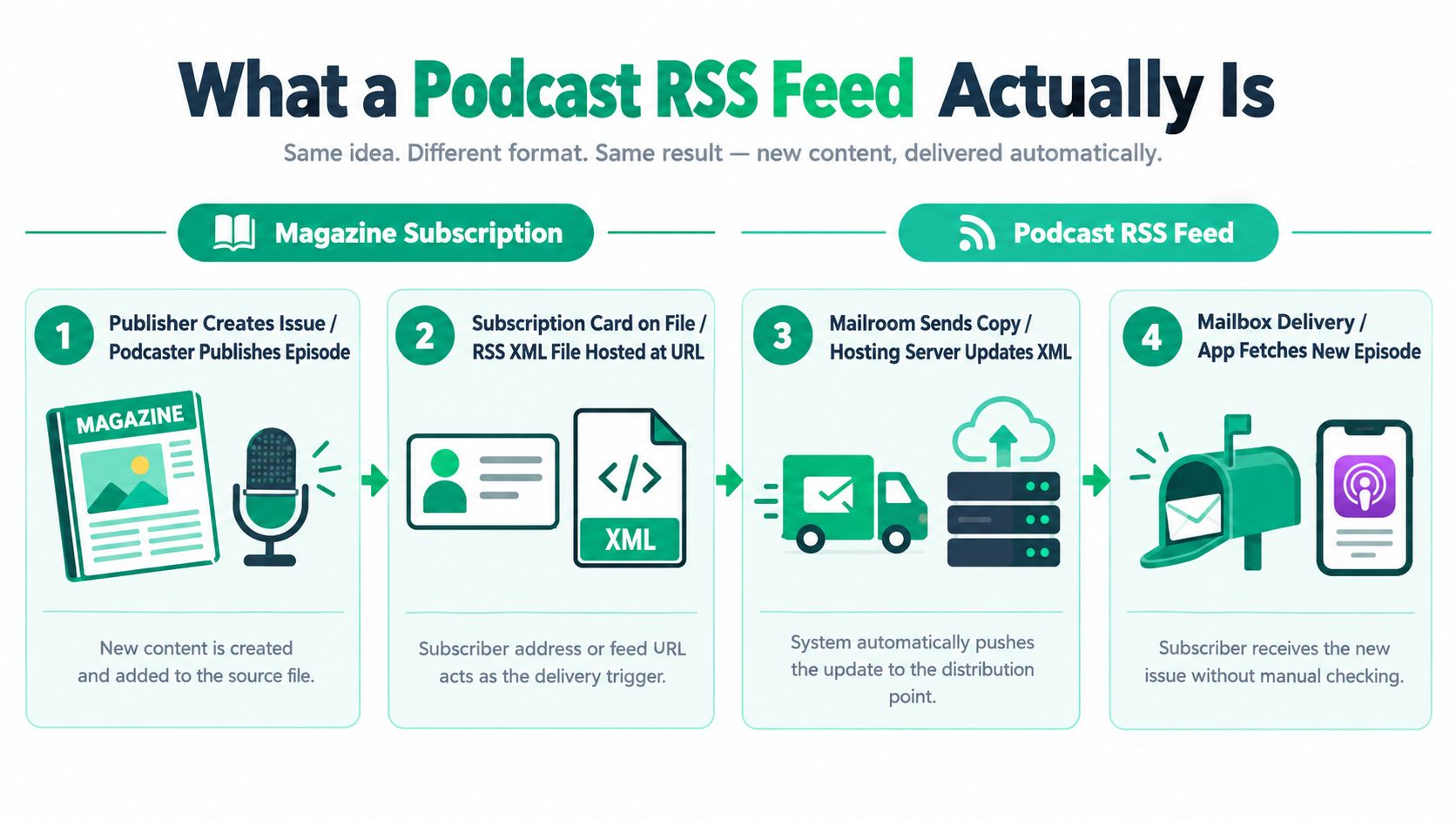
At the top of the file is the channel, which describes the show itself. Inside that are item entries, one for each episode. Every time you publish, your hosting platform adds another item.
The tag that makes podcasting different from a normal blog feed is the enclosure. That's the element that points to the actual audio file and tells apps what kind of file it is. Without that, a feed may still be valid XML, but it's not a usable podcast feed.
Here's a simple way to think about it:
A visual walk-through helps if you're more of a watch-and-see learner:
RSS may sound dated, but it still carries a huge amount of publishing activity. One industry report says more than 25,000 new podcast episodes are published via RSS feeds every day, which shows how central the format remains to global audio distribution and analytics workflows, according to this roundup of RSS podcast industry statistics.
If your feed breaks, that daily machine no longer picks up your show. That's why experienced podcasters treat the feed less like a form and more like infrastructure.
When people first open a feed, they often think it looks like unreadable code. It's repetitive once you know the pattern. Most of the work happens in a few predictable blocks.
<rss version="2.0"
  xmlns:itunes="http://www.itunes.com/dtds/podcast-1.0.dtd"
  xmlns:content="http://purl.org/rss/1.0/modules/content/"
  xmlns:podcast="https://podcastindex.org/namespace/1.0">
  <channel>
    <title>Example Show</title>
    <link>https://example.com/podcast</link>
    <description>A weekly show about product design.</description>
    <language>en-us</language>
    <itunes:author>Example Media</itunes:author>
    <itunes:explicit>false</itunes:explicit>
    <item>
      <title>Episode 1</title>
      <description>Our first episode.</description>
      <pubDate>Mon, 01 Jan 2026 10:00:00 GMT</pubDate>
      <guid isPermaLink="false">ep-001</guid>
      <enclosure url="https://example.com/audio/ep-001.mp3" length="123456" type="audio/mpeg" />
      <itunes:duration>18:32</itunes:duration>
    </item>
  </channel>
</rss>
At the top, the <rss> root declares the format version and the namespaces the feed will use later. Then <channel> wraps the show-level metadata. Inside that, each <item> represents one episode.
Some tags identify the show clearly enough for apps and directories to list it correctly. Others improve display quality and categorization.
Apple's podcast requirements document shows feeds built on RSS 2.0 with itunes and content namespaces, while newer guidance often adds the podcast namespace for newer tags. Apple also expects a public, non-password-protected feed for standard submission workflows, as described in Apple's podcast feed requirements.
| Tag | Location | Required | Purpose |
|---|---|---|---|
title |
channel | Yes | Names the show |
link |
channel | Yes | Points to the show website or homepage |
description |
channel | Yes | Describes the show |
language |
channel | Recommended | Helps apps classify the show |
itunes:author |
channel | Recommended | Gives the creator or brand name |
itunes:image |
channel | Recommended | Supplies artwork for directories |
itunes:category |
channel | Recommended | Helps directory categorization |
itunes:explicit |
channel | Recommended | Signals content rating |
itunes:type |
channel | Recommended | Distinguishes episodic from serial behavior |
An episode entry needs enough information for an app to identify it, sort it, and fetch the media.
Practical rule: If an episode has a broken
enclosure, listeners don't have an episode. They have metadata about an episode.
Important episode tags usually include:
title for the episode name shown in appspubDate for timing and sortingguid for durable identityenclosure for the media file URL, file length, and MIME typeitunes:duration for playback lengthitunes:episode, itunes:season, and itunes:episodeType for richer organizationValidators often focus on syntactic correctness. Directories often reward richer metadata. That's a useful distinction when a feed is “valid” but still underperforming in apps.
If you go looking for a feed URL, it's usually for one of three reasons. You want to subscribe in a podcast app that didn't auto-detect the show. You want to test the feed in a validator. Or you're preparing for a host migration and need to confirm the canonical address.
The quickest route is often the show's own website. Open the page on desktop, view page source, and search for rss or rel="alternate". Many podcast sites expose the feed that way.
Another easy route is the site footer, About page, or header navigation. Hosts often place an RSS icon there, though not always prominently.
If you control the show, check the dashboard for the hosting platform or directory account that manages the public listing. Many creator tools expose the feed directly in settings. If you're also working through distribution choices, this guide on how to publish a podcast on Spotify gives context for where the feed sits in that workflow.
For public shows, a podcast index or directory listing may show the canonical feed URL. That's useful when the website is polished but hides the technical details.
Use caution, though. A directory may still point to an older address after a migration, especially if redirects are involved.
If you bookmark a feed URL before a host switch, revisit it after the migration. A saved old URL can keep working for a while, then fail later if the redirect chain breaks.
Before you trust the address, confirm a few basics:
Creators often assume the hardest part is discovering the feed. In practice, the harder part is knowing whether it's the stable, production-ready one.
A podcast feed is built on RSS 2.0, but podcast apps rarely stop there. They expect a second layer made of namespaces, which are XML extensions that add podcast-specific meaning.
RSS 2.0 by itself can describe a channel, a title, a description, and a list of items. It can also carry the enclosure that points to the audio file. That's enough to represent a very basic show.
Podcast directories needed more than generic RSS could express cleanly. They needed author names, content ratings, categories, artwork, episode numbers, seasons, transcript links, and other details.
So the ecosystem extended RSS instead of replacing it.
The most familiar extension is the iTunes namespace. Even apps that aren't Apple products often read those tags because Apple's metadata conventions became widely adopted. The content namespace supports rich HTML content, often used for longer show notes. The newer podcast namespace adds room for transcripts, chapters, people, and other newer features.
| Namespace | Key Elements | What It Unlocks |
|---|---|---|
| RSS 2.0 | channel, item, title, description, pubDate, guid, enclosure |
Basic show and episode delivery |
itunes |
itunes:author, itunes:image, itunes:category, itunes:summary, itunes:episode, itunes:season, itunes:explicit, itunes:type |
Directory compatibility and richer listing metadata |
content |
content:encoded |
Rich HTML show notes and fuller content blocks |
podcast |
transcript, chapters, person, location, locked, value-related tags | Newer app features and enhanced metadata |
A feed can be valid XML and still disappoint apps if the namespace declarations don't match the tags used later in the file. If your feed includes itunes: or podcast: elements but the root doesn't declare those namespaces correctly, some clients ignore them.
That's why feed design shouldn't start with “generate generic XML and patch it later.” It should start with the platforms you need to satisfy, then map your internal data to the correct tag set.
For newer creators, the practical takeaway is simple:
A lot of “my feed looks fine, but the artwork or category won't update” complaints begin.
Most explainers stop at “run it through a validator.” That's useful, but it misses the failures creators trip over in production.
A feed is a live URL, queried repeatedly by different systems, each with its own cache, parser behavior, and tolerance for weirdness. Reliability problems show up after publication, especially when you edit metadata, replace audio, or switch hosts.
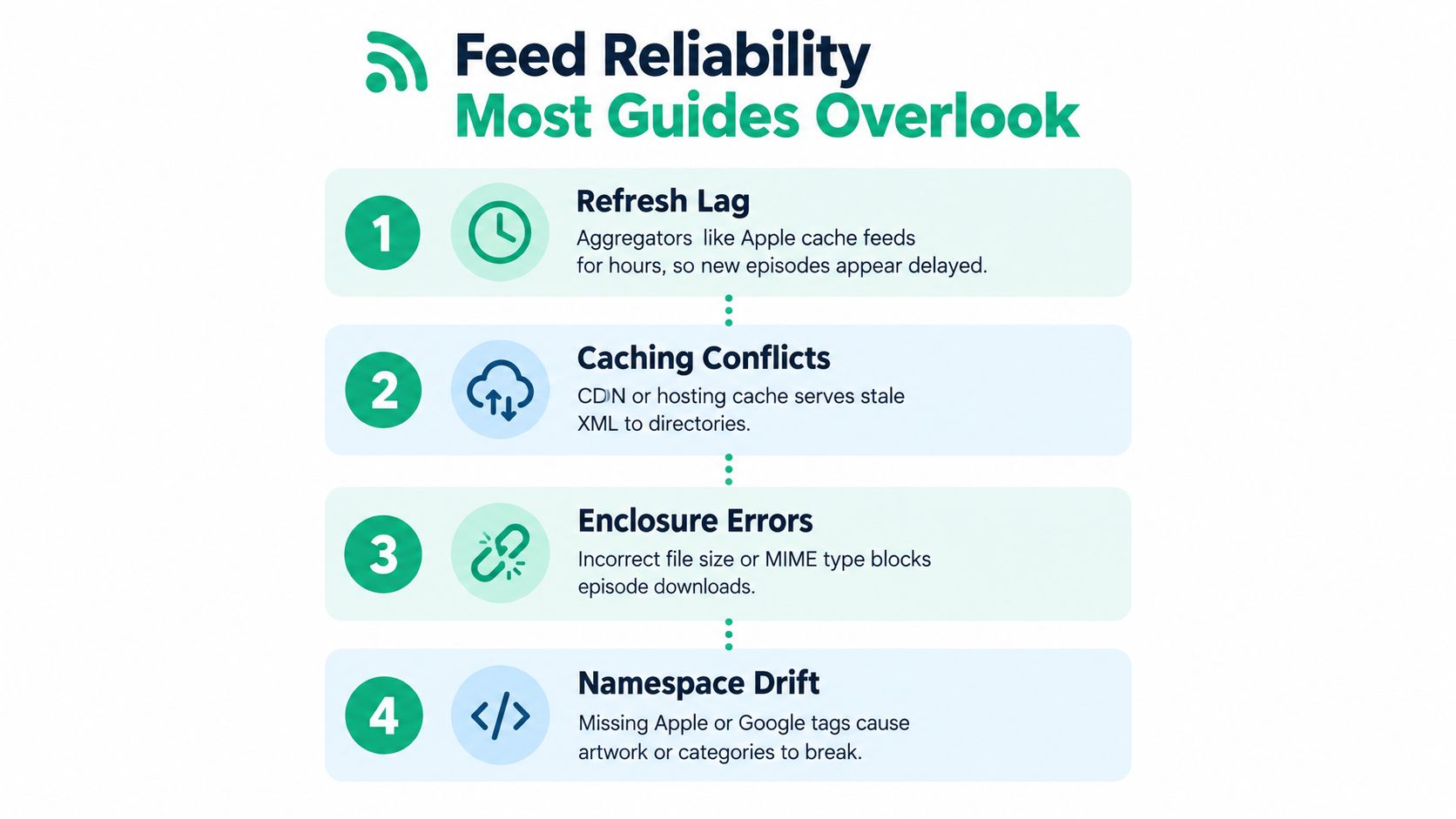
Apple's validation guidance notes that feeds must be publicly addressable, support HEAD and byte-range requests, and use a stable GUID per episode. It also notes that refresh timing can lag after edits, which is why changes don't always appear immediately in apps, as described in Apple's feed validation guidance.
That delay confuses creators who fix a typo, swap artwork, or re-upload audio and expect instant propagation. The feed may already be corrected at the origin while directories still serve older cached data.
If you run private or membership feeds, these issues matter even more because authentication layers add another place things can go wrong. That's also why some creators look for systems designed around controlled subscription delivery, such as a private podcast RSS feed.
“Valid” and “reliable” are not the same thing.
For teams generating feeds programmatically, including services like Rooy Development's Flow that deliver episodes through private feeds, the safer pattern is to treat the feed as production infrastructure. Keep URLs stable, avoid unnecessary GUID changes, and test edits in real podcast apps instead of assuming the validator is the final judge.
When a feed breaks, the visible symptom is rarely the cause. The trick is to debug from the outside in. Start with what listeners see, then inspect the feed, then inspect the media file and metadata.
If Apple Podcasts or another app won't list the show, the usual causes are a non-public feed, malformed metadata, missing podcast-specific tags, or a feed URL that resolves inconsistently.
Check the feed in a validator first. Then open the feed directly in a browser to confirm it's reachable without login prompts or odd redirects. If the file opens but the listing still fails, inspect whether the feed is using the expected namespaces and show-level metadata.
This usually points to the enclosure rather than the feed shell.
Check whether the audio URL is reachable and whether the file type matches what the feed claims it is. If the app sees the episode title but playback fails, the parser probably succeeded and the media delivery didn't.
Useful checks include:
Duplicate entries often trace back to GUID problems. If you republish an episode with a different GUID, some apps treat it as brand-new content rather than an update to an existing item.
The same symptom can also appear during migrations if the old and new feeds are both accessible without a clean handoff.
Keep the GUID stable even when you edit titles, summaries, or artwork. Identity should outlive presentation changes.
Caching causes the most frustration. The feed may already contain the corrected image or category while one directory still shows the old version.
Wait before changing things repeatedly. Repeated edits during cache lag create extra noise and make it harder to tell which state is propagating. If the issue persists across multiple refresh cycles, inspect the image tag, image file accessibility, and namespace correctness.
If one app rejects the feed while another accepts it, don't assume the stricter app is wrong. Different clients are tolerant in different places.
A simple sequence works well:
That order catches most practical podcast RSS feed problems without requiring deep XML expertise.
The easiest mental model is this: a podcast RSS feed is a live XML file at a stable URL, apps cache it, directories refresh it on their own schedule, and those systems read both standard RSS tags and podcast-specific namespaces.
If one part of that chain is weak, listeners feel it somewhere else. A stale cache looks like a missing update. A changed GUID looks like a duplicate episode. A broken enclosure looks like a playback issue.
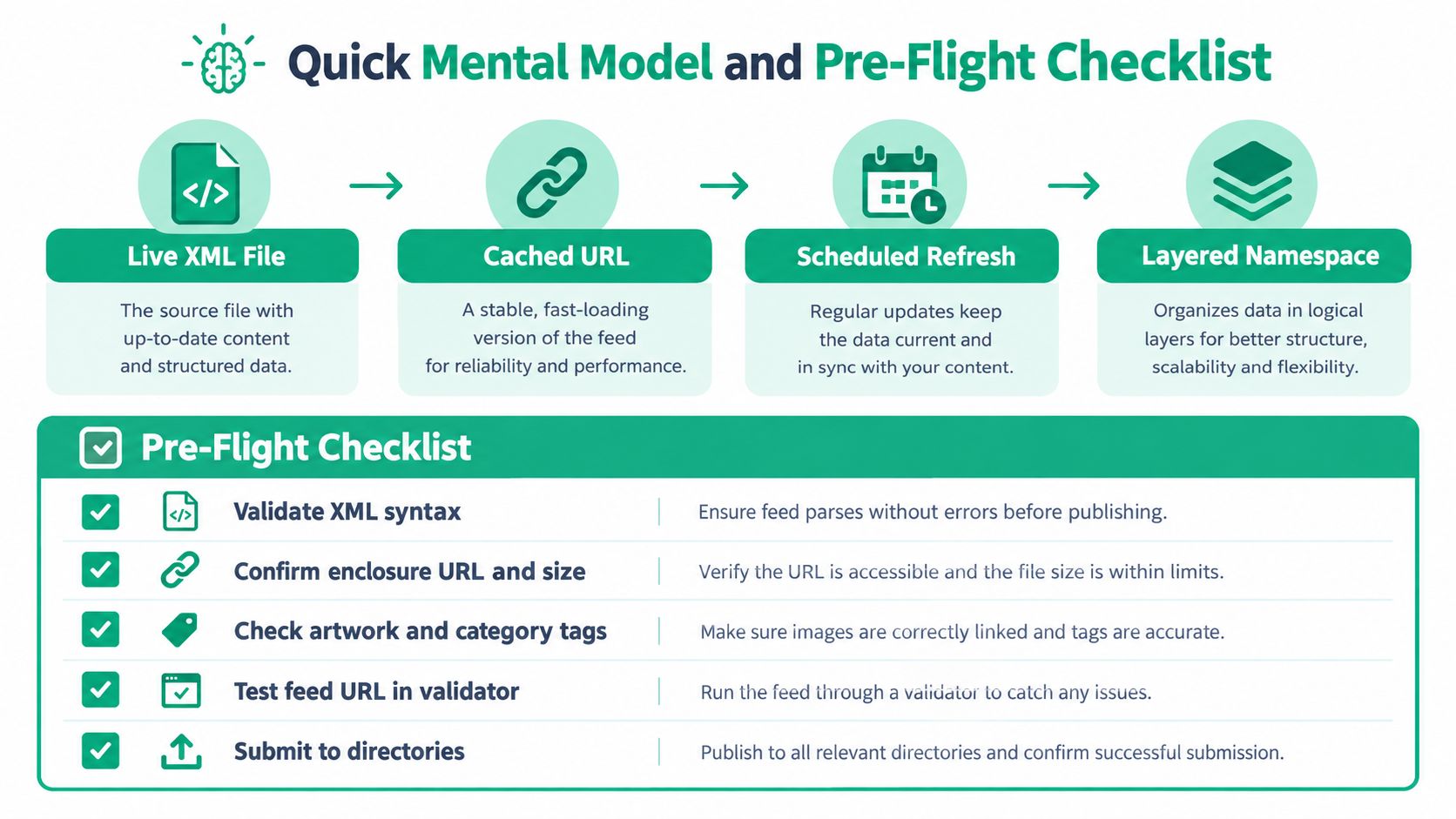
Before publishing, migrating, or debugging, run through these points:
Bookmark your preferred validator and keep a copy of your current feed output when making major changes. Treat the feed like you'd treat a production webpage or an API response. It deserves monitoring.
For public shows, the feed is still the transport layer that powers distribution. For private series, it's the subscription contract between your system and the listener's app. Either way, mastering the feed removes a lot of mystery from podcast publishing.
Rooy Development offers tools that turn selected sources into recurring podcast episodes and deliver them through subscribeable feeds, including private feed workflows that fit the reliability issues covered above. If you want to see how that kind of feed-based delivery works in practice, visit Rooy Development.
Transform your content into engaging podcasts in seconds with our AI-powered platform.
Get Started Now